本文提供一些 Hugo Syntax 例子。
文本
1
2
3
4
5
6
| - *粗体* *bold*
- /斜体/ /italic/
- _下划线_ _underline_
- =代码= =code=
- ~摘录~ ~verbatim~
- +删除线+ +strike-through+
|
- 粗体 bold
- 斜体 italic
- 下划线 underline
代码 code摘录 verbatim删除线 strike-through
链接
1
2
| - [[http://emacs.org]]
- [[http://emacs.org][Emacs]]
|
列表
无序列表
1
2
3
4
5
| - 用 =-,+= 都可以。
- 无序列表支持多级嵌套列表
- 只要缩进就行
- 再次缩进又是一层级
+ 再次回到第一层级
|
有序列表
1
2
3
| 1. 数字并不代表真实序号。
2. 系统自动给出编号。
6. [@6] 需要手工编号,用 [@N] 。
|
- 数字并不代表真实序号。
- 系统自动给出编号。
- 需要手工编号,用 [@N] 。
公式
基本公式
- 这是行内公式(inline equation)的例子,用
$...$ 或 \(...\) 包括:如 \(E=mc^2\) ,或是 \(e^{i\pi}+1=0\)。 - 这是行间公式(displayed equation)的例子,用
$$...$$ 或 \[...\] 包括: \[\cos\theta=1- \frac {2*(\tan\alpha’)^2*(\tan\gamma’)^2} {(\tan\alpha’*\tan\gamma’)^2+(\tan\alpha’)^2+(\tan\gamma’)^2}\] - 或是直接用
\begin{equation}...\end{equation} :
1
2
3
4
| \begin{equation}
\label{eq_1}
\alpha+\beta=\gamma+\delta
\end{equation}
|
     \begin{equation}
      \label{eq_1}
      \alpha+\beta=\gamma+\delta
     \end{equation}
多行公式
gather
全部公式居中
1
2
3
4
| \begin{gather}
x=\alpha+\beta+\gamma \\
y=\delta+\epsilon
\end{gather}
|
     \begin{gather}
      x=\alpha+\beta+\gamma \\
      y=\delta+\epsilon
     \end{gather}
align
用 & 指定对齐
1
2
3
4
| \begin{align}
x&=\alpha+\beta+\gamma \\
y&=\delta+\epsilon
\end{align}
|
     \begin{align}
      x&=\alpha+\beta+\gamma \\
      y&=\delta+\epsilon
     \end{align}
split
单独一个编号,需要嵌套在 equation 中
1
2
3
4
5
6
| \begin{equation}
\begin{split}
\cos 2x &= \cos^2 x - \sin^2 x \\
&=2\cos^2x-1
\end{split}
\end{equation}
|
     \begin{equation}
      \begin{split}
       \cos 2x &= \cos^2 x - \sin^2 x \\
       &=2\cos^2x-1
      \end{split}
     \end{equation}
cases
公式组合
1
2
3
4
5
6
| \begin{equation}
D(x)=\begin{cases}
1, & \text{if } x \in \mathbb{Q} \\
0, & \text{if } x \in \mathbb{R}
\end{cases}
\end{equation}
|
     \begin{equation}
      D(x)=\begin{cases}
      1, & \text{if } x \in \mathbb{Q} \\
      0, & \text{if } x \in \mathbb{R}
      \end{cases}
     \end{equation}
表格
直接用 org 的表格:
| Head A | Head B | Head C |
|---|
| item A | item B | item C |
图片
用 [[file:url]] 插入,Hugo 会复制到 <HUGO>/static/ox-hugo/ 目录下。

代码
1
2
3
4
5
| #include "stdlib.h"
int main(int argc, char **argv) {
printf("Hello World!");
exit(0);
}
|
1
2
3
4
5
6
7
8
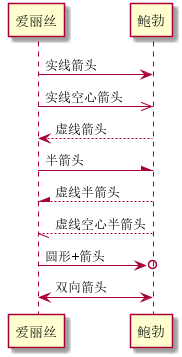
| 爱丽丝 -> 鲍勃: 实线箭头
爱丽丝 ->> 鲍勃: 实线空心箭头
鲍勃 --> 爱丽丝: 虚线箭头
爱丽丝 -\ 鲍勃: 半箭头
爱丽丝 /-- 鲍勃: 虚线半箭头
爱丽丝 \\-- 鲍勃: 虚线空心半箭头
爱丽丝 ->o 鲍勃: 圆形+箭头
爱丽丝 <-> 鲍勃: 双向箭头
|
Author
winsphinx
LastMod
2019-07-22
(6de08025)
[原创] A Guide of Hugo Syntax in Emacs
License